
2020
Hand Detection and Finger Counting

Related Links
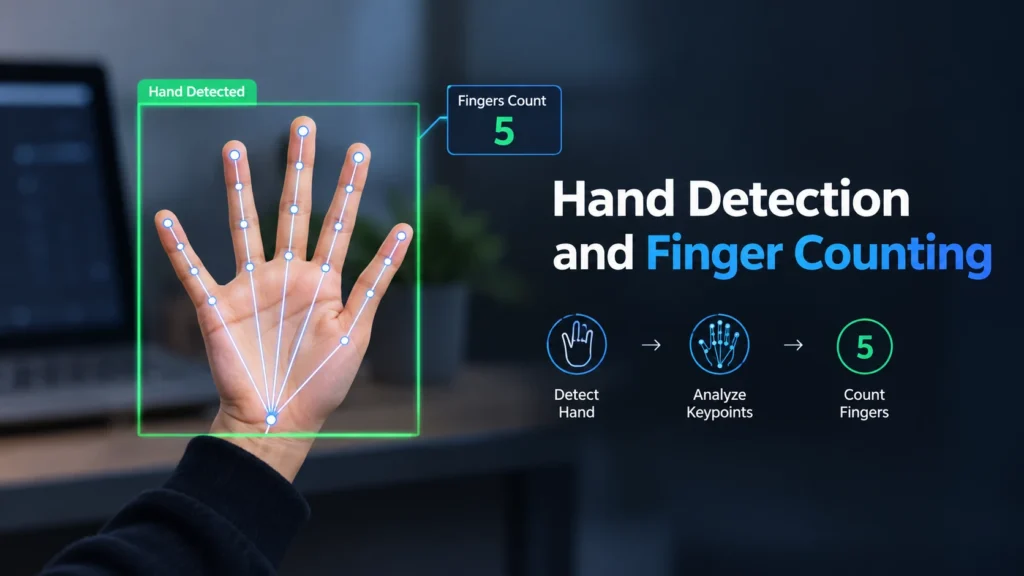
This project focuses on the implementation of a program for detecting a human hand based on color. Using the necessary commands and logic, we can also count the number of detected fingers.
For this implementation we are using the Python language. We also need some packages to import. The basic package that we are using for color detection is OpenCV.
Feel free to check the following video on YouTube for a better, visual understanding of this project and its concepts.
Import libraries
import numpy as np
import math
import cv2
Preparing the Environment
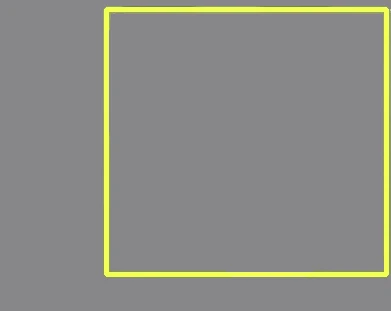
We are going to define a smaller window (test_window) inside the main frame which will be the ROI (Region of Interest). Only inside this window the tests will be visible.
# Define the Region Of Interest (ROI) window
top_left = (245, 50)
bottom_right = (580, 395)
cv2.rectangle(frame, (top_left[0] - 5, top_left[1] - 5), (bottom_right[0] + 5, bottom_right[1] + 5), (0, 255, 255), 3)
Using the shape function we can get the size (width and height) of the frame.
# Frame shape: height and width
h, w = frame.shape[:2]  # h, w = 480, 640
Create a mask for the hand
Focus only on the user’s hand. In this part the hand must be isolated from the background. To achieve this we are going to apply Gaussian Blur on the ROI.
test_window_blurred = cv2.GaussianBlur(test_window, (5, 5), 0)The window is in BGR format by default. We are going to convert it to HSV format.
# Convert ROI only to HSV format
hsv = cv2.cvtColor(test_window_blurred, cv2.COLOR_BGR2HSV)
Color Trackbars
In order to find the user’s skin color (array values), the user can modify the trackbars until the hand is the only thing that is visible. To enable the trackbars window, someone must define it before starting the program. So after importing the necessary packages, add this part of the code.
def nothing(x):
    pass

cv2.namedWindow("trackbars")
cv2.createTrackbar("Lower-H", "trackbars", 0, 179, nothing)
cv2.createTrackbar("Lower-S", "trackbars", 0, 255, nothing)
cv2.createTrackbar("Lower-V", "trackbars", 0, 255, nothing)
cv2.createTrackbar("Upper-H", "trackbars", 179, 179, nothing)
cv2.createTrackbar("Upper-S", "trackbars", 255, 255, nothing)
cv2.createTrackbar("Upper-V", "trackbars", 255, 255, nothing)
After that, it’s time to define a range for the colors, based on arrays.
# Find finger (skin) color using trackbars
low_h = cv2.getTrackbarPos("Lower-H", "trackbars")
low_s = cv2.getTrackbarPos("Lower-S", "trackbars")
low_v = cv2.getTrackbarPos("Lower-V", "trackbars")
up_h = cv2.getTrackbarPos("Upper-H", "trackbars")
up_s = cv2.getTrackbarPos("Upper-S", "trackbars")
up_v = cv2.getTrackbarPos("Upper-V", "trackbars")

# Create a range for the colors (skin color)
lower_color = np.array([low_h, low_s, low_v])
upper_color = np.array([up_h, up_s, up_v])
Finally, get the mask.
# Create a mask
mask = cv2.inRange(hsv, lower_color, upper_color)
cv2.imshow("Mask", mask)  # Show mask frame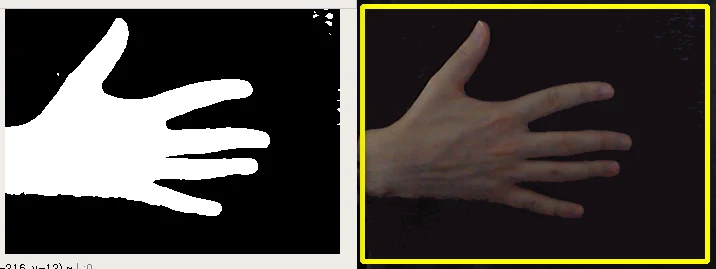
Computing the maximum contour and its convex hull
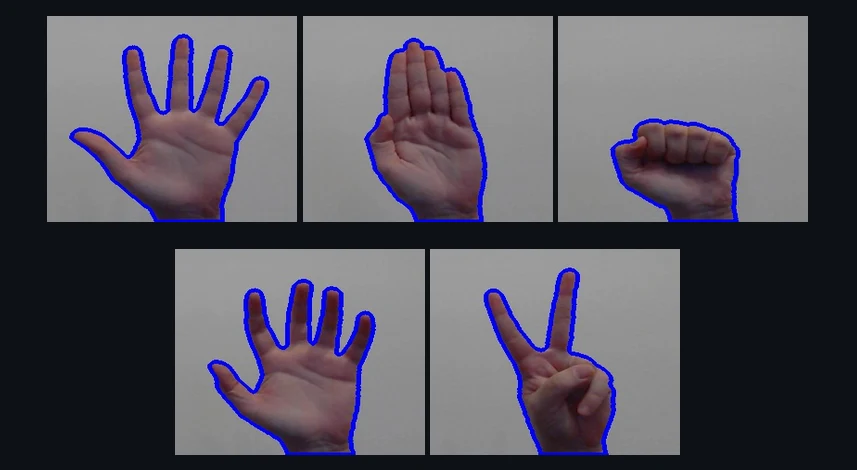
For each frame on the video capture, find the maximum contour inside the ROI.
if len(contours) > 0:
    # Find the maximum contour each time (on each frame)
    # --Max Contour--
    max_contour = max(contours, key=cv2.contourArea)
    # Draw maximum contour (blue color)
    cv2.drawContours(test_window, max_contour, -1, (255, 0, 0), 3)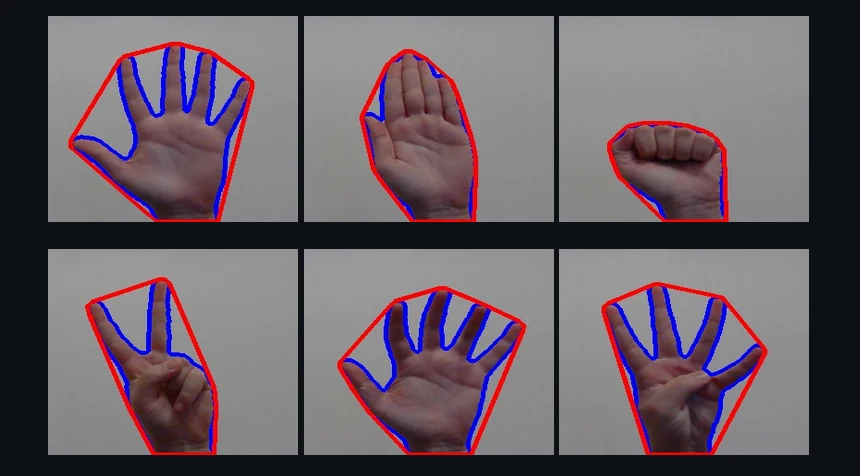
# Find the convex hull "around" the max_contour
# --Convex Hull--
convhull = cv2.convexHull(max_contour, returnPoints=True)
# Draw convex hull (red color)
cv2.drawContours(test_window, [convhull], -1, (0, 0, 255), 3, 2)
Finding the point with the minimum y-value
This is the highest point of the convex hull.
min_y = h  # Set the minimum y-value equal to frame's height value
final_point = (w, h)
for i in range(len(convhull)):
    point = (convhull[i][0][0], convhull[i][0][1])
    if point[1] < min_y:
    min_y = point[1]
    final_point = point
# Draw a circle (black color) to the point with the minimum y-value
cv2.circle(test_window, final_point, 5, (0, 0, 0), 2)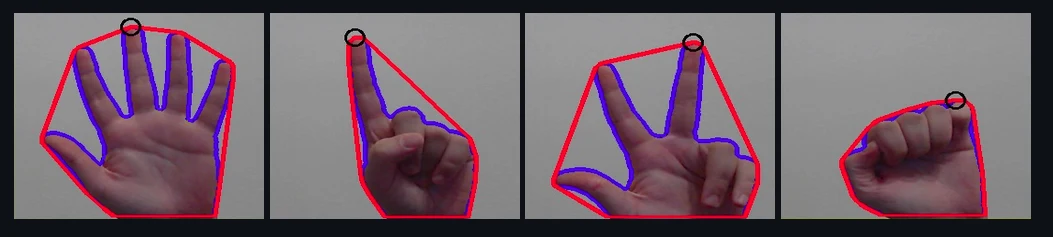
Finding the center of the max_contour
The center of the max contour is defined by the point (cx, cy) using cv2.moments().
M = cv2.moments(max_contour)  # Moments

# Find the center of the max contour
if M["m00"] != 0:
    cX = int(M["m10"] / M["m00"])
    cY = int(M["m01"] / M["m00"])
    # Draw circle (red color) in the center of max contour
    cv2.circle(test_window, (cX, cY), 6, (0, 0, 255), 3)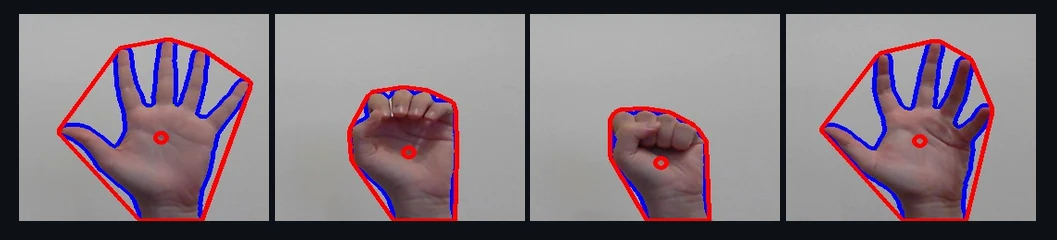
Calculating the Defect points
Find and draw the polygon that is defined by the contour.
# --Contour Polygon--
contour_poly = cv2.approxPolyDP(max_contour, 0.01 * cv2.arcLength(max_contour, True), True)
# Draw contour polygon (white color)
cv2.fillPoly(test_window, [max_contour], text_color)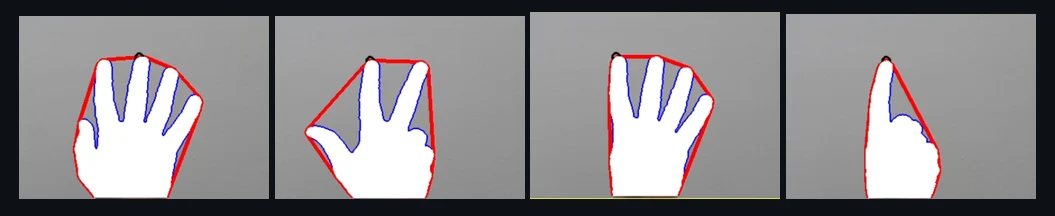
The result of the command
defects = cv2.convexityDefects(contour_poly, hull)is an array where each row contains the values:
- start point
- end point
- farthest point
- approximate distance to farthest point
Then find these points plus the mid points on each frame as below.
points = []
for i in range(defects.shape[0]): # Len of arrays
start_index, end_index, far_pt_index, fix_dept = defects[i][0]
start_pts = tuple(contour_poly[start_index][0])
end_pts = tuple(contour_poly[end_index][0])
far_pts = tuple(contour_poly[far_pt_index][0])
mid_pts = (int((start_pts[0] + end_pts[0]) / 2), int((start_pts[1] + end_pts[1]) / 2))
points.append(mid_pts)
#--Start Points-- (yellow color)
cv2.circle(test_window, start_pts, 2, (0, 255, 255), 2)
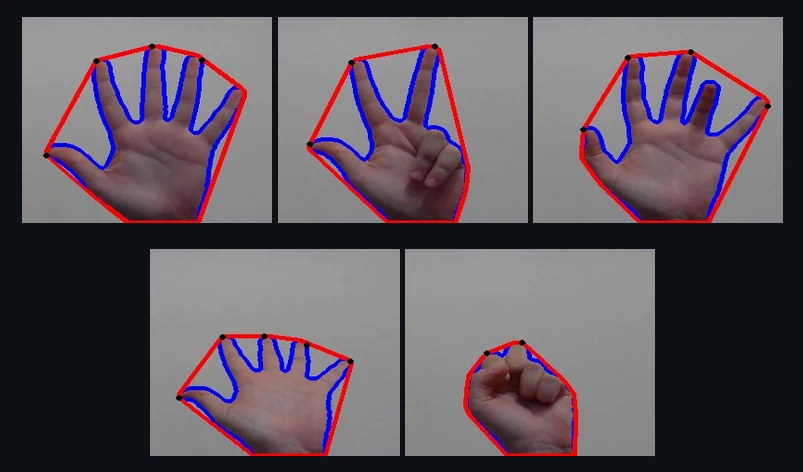
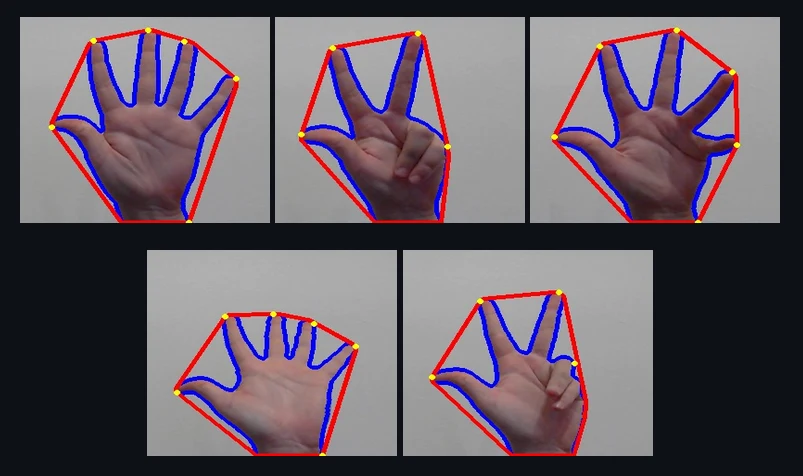 #--End Points-- (black color)
cv2.circle(test_window, end_pts, 2, (0, 0, 0), 2)
#--End Points-- (black color)
cv2.circle(test_window, end_pts, 2, (0, 0, 0), 2)
 #--Far Points-- (white color)
cv2.circle(test_window, far_pts, 2, text_color, 2)
#--Far Points-- (white color)
cv2.circle(test_window, far_pts, 2, text_color, 2)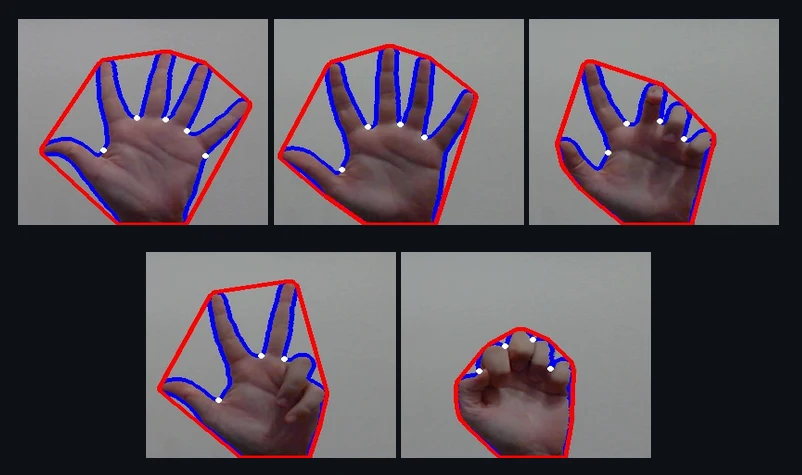
Finger Counting
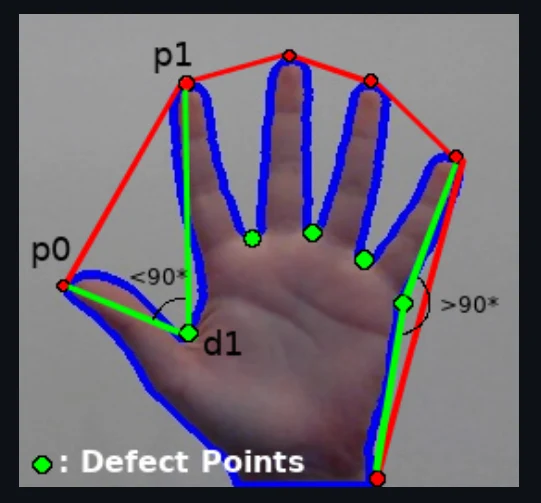
In order to do the finger counting we should find a way to check how many fingers are displayed. To do this we are calculating the angle between the start point, defect point and end point, as shown below.
# --Calculate distances--
# If p1 = (x1, y1) and p2 = (x2, y2) are two points, then the distance between them is
# Dist : sqrt[(x2-x1)^2 + (y2-y1)^2]

# Distance between the start and the end defect point
a = math.sqrt((end_pts[0] - start_pts[0]) ** 2 + (end_pts[1] - start_pts[1]) ** 2)
# Distance between the farthest (defect) point and the start point
b = math.sqrt((far_pts[0] - start_pts[0]) ** 2 + (far_pts[1] - start_pts[1]) ** 2)
# Distance between the farthest (defect) point and the end point
c = math.sqrt((end_pts[0] - far_pts[0]) ** 2 + (end_pts[1] - far_pts[1]) ** 2)

angle = math.acos((b ** 2 + c ** 2 - a ** 2) / (2 * b * c))  # Find each angle
# If angle > 90 then the farthest point is "outside the area of fingers"
if angle <= 90:
    count += 1
    frame[0:40, w - 40:w] = (0)
Display Finger Counter
for c in range(5):
    if count == c:
        cv2.putText(frame, str(count + 1), (w - 35, 30), font, 2, text_color, 2)

if len(points) <= 1:
    frame[0:40, w - 40:w] = (0)
        cv2.putText(frame, "1", (w - 35, 30), font, 2, text_color, 2)
Conclusion
This project is aiming at understanding topics such as contours, convex hull and contour polygon.
It also focuses on the defect points which we find on the detected hand.
For a better, visual understanding of this project and its concepts, watch the video on YouTube.