
2021
Drowsiness Detection

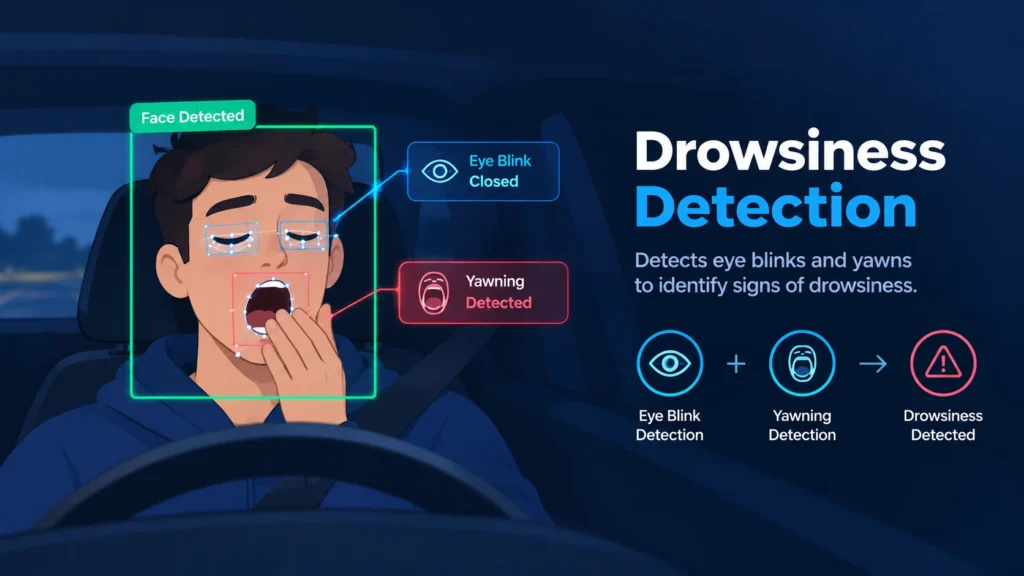
Real time drowsiness detection (blinks or yawns) with OpenCV using facial landmarks.
For a more detailed explanation of this project (more details and theory) read drowsiness_detection.pdf.
You are free to use this file, just leave a reference to this url-link « https://github.com/kostasthanos/Drowsiness-Detection ».
Drowsiness detection on sleepy driver
Main Idea
The main idea of this project is to detect drowsiness. In other words, we are trying to detect eye blinks or yawns and decide about drowsiness. We will use the dlib library for detecting faces and predicting the facial landmarks of a person.
import dlib

# DLIB - Face Detector
detector = dlib.get_frontal_face_detector()

# DLIB - Predictor
predictor = dlib.shape_predictor('Models/shape_predictor_68_face_landmarks.dat')
Using the above detector and predictor, after converting the frame (video capture) into grayscale, we detect faces on it. After that it’s time to determine the facial landmarks.
while True:
    _, frame = cap.read()
    h, w = frame.shape[:2]   # Height and Width of frame

    gray = cv2.cvtColor(frame, cv2.COLOR_BGR2GRAY)  # Grayscale
    faces = detector(gray, 0)  # Detect faces in the gray frame

    # Loop through each face
    for face in faces:
        facial_landmarks = predictor(gray, face)  # Determine facial landmarks
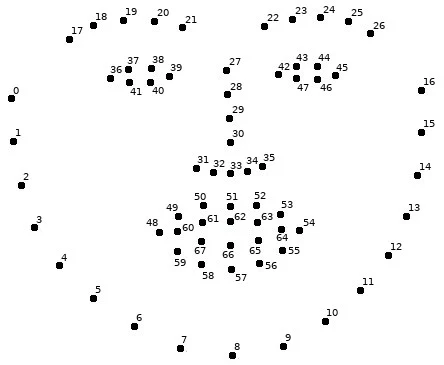
Below you can see a representation of the numbered facial landmarks.
Eyes and Lips
Now that we have already detected the facial landmarks we can concentrate on the eyes and lips of a face in order to detect blinks or yawns respectively.
Eyes
As shown in the facial landmarks image, we can define two lists with numbers corresponding to the left and right eye.
# Landmark indexes for eyes
left_eye = [36, 37, 38, 39, 40, 41]
right_eye = [42, 43, 44, 45, 46, 47]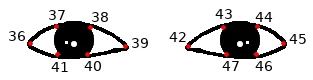
Blink Detection
In order to build a function that will help us determine if there is a blink or not, we could use the Eye Aspect Ratio (E.A.R.) value as defined in the paper Real-Time Eye Blink Detection using Facial Landmarks (Soukupová, Čech).
Let’s enumerate the facial landmarks of a single eye with points P1 to P6.
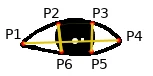
We will calculate the two vertical distances between points P2–P6 (dist1) and P3–P5 (dist2), and the horizontal (largest) distance between points P1–P4 (dist3). So the E.A.R. (from now on ear) is defined as:
ear = (dist1 + dist2) / (2 * dist3)The above explanation and calculation refers to only one eye. In order to use both eyes’ ear, we can find the average eye aspect ratio from the two eyes (left and right).
Is it a blink or not?
How do we decide if there is a blink or not by the ear value? We can set an ear threshold. This means that if the current value is less than the threshold, then it’s a blink.
How do we do this? We can plot the ear value for each frame. Below is a simple example that I made to define my ear threshold value.
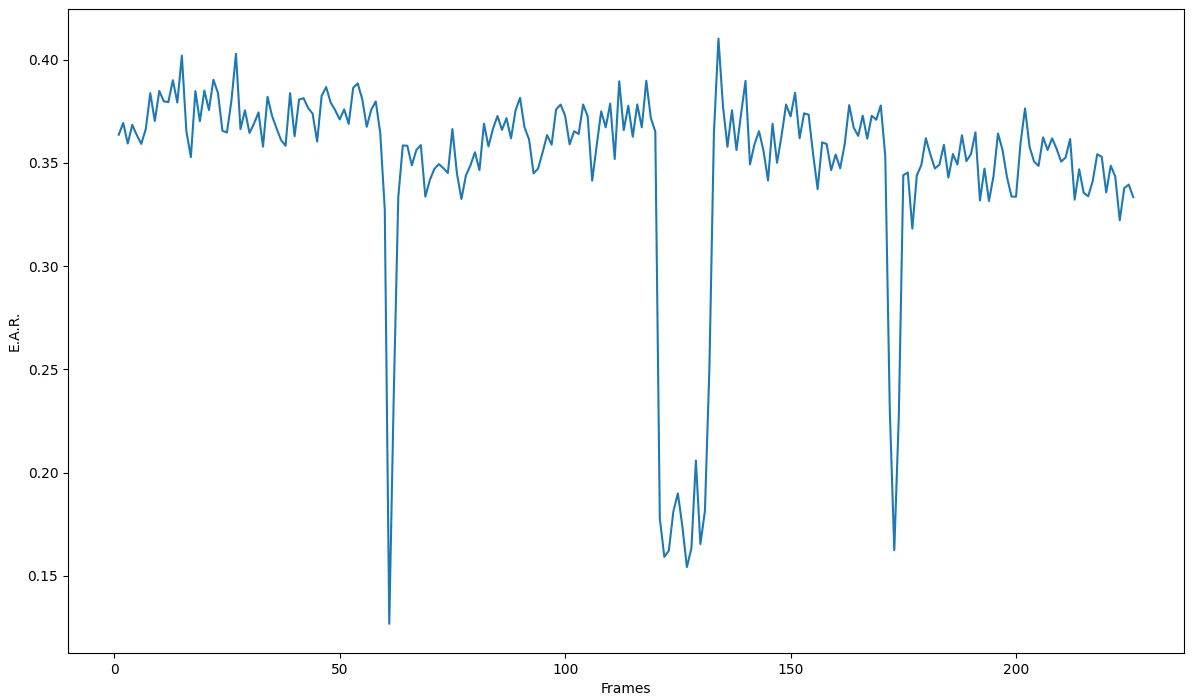
As a result, I will set my ear threshold value to 0.3 at the beginning of our code.
# E.A.R. threshold
ear_thresh = 0.3
Lips
To find out if there is a yawn or not, we will work exactly as before on the eyes section. First let’s define a list with numbers corresponding to the lips part of a face, as shown in the facial landmarks image.
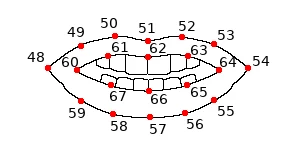
# Landmark indexes for lips
lips = [60, 61, 62, 63, 64, 65, 66, 67]
Yawn Detection
We will define a function similar to the eyes’ function, in order to calculate the Lips Aspect Ratio (L.A.R.). Let’s enumerate the facial landmarks corresponding to the “interior” lips with points L1 to L8.
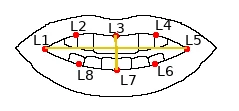
Now we can calculate the vertical distance between points L3 and L7 (dist1) and the horizontal distance between points L1 and L5 (dist2). So the L.A.R. (from now on lar) is defined as:
lar = dist1 / dist2Is it a yawn or not?
As in blink detection, we are going to set a lar threshold. Here it means that if the current value is greater than the threshold, then it is a yawn.
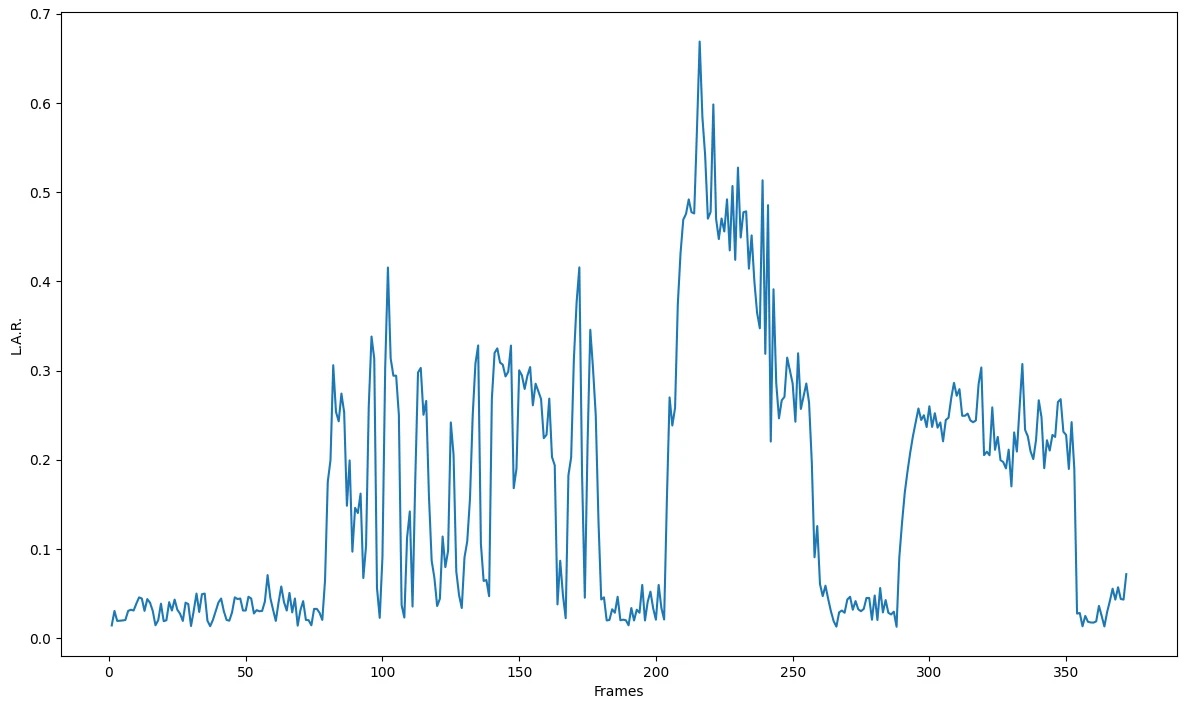
This plot is quite different from the one for ear threshold values per frame. Here there are 4 different time periods (frame periods) with different situations. These situations are:
- Lips closed
- Speaking
- Yawning
- Smiling
As a result, I will set my lar threshold value to 0.5 at the beginning of our code.
# L.A.R. threshold
lar_thresh = 0.5
Drowsiness Detection
By combining the eye aspect ratio (ear) and lips aspect ratio (lar) values, we can decide if there is drowsiness or not.
if total_yawns > 2 or total_blinks > 3:
    cv2.putText(frame, "ALERT", (w - 120, 160), font, 1.2, (0, 0, 255), 4)
For a more detailed explanation of this project, read drowsiness_detection.pdf.